



Description
spread expansion.
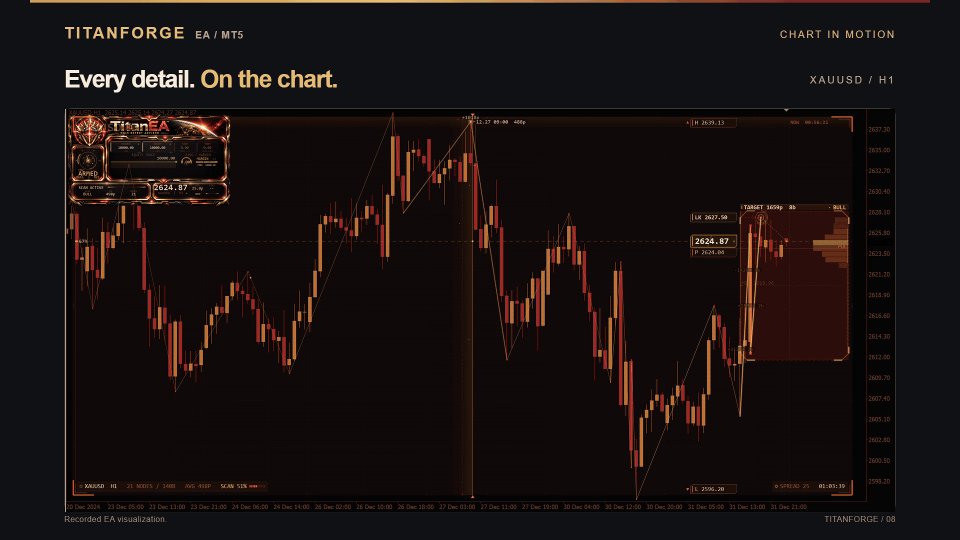
ON-CHART INFORMATION PANEL
TitanForge EA includes a lightweight information panel directly on the trading chart.
The panel can display:
- Current EA status
- Scanning and trading status
- Current spread
- Candle countdown
- Trading levels
- Execution information
- Strategy status
The information panel can be enabled or disabled directly from the EA settings.
BACKTEST INFORMATION
Historical testing was performed using real tick modeling.
LONG-TERM TEST — 2020–2026
- Profile: Maximum Risk Test
- Total Trades: 1,175
- Winning Trades: 1,141
- Losing Trades: 34
- Win Rate: 97.11%
- Profit Factor: 49.69
- Sharpe Ratio: 11.86
- Recovery Factor: 90.87
- Relative Drawdown: 36.51%
RECENT MARKET TEST — 2025–2026
- Risk Level: 4
- Total Trades: 349
- Winning Trades: 344
- Losing Trades: 5
- Win Rate: 98.57%
- Profit Factor: 53.98
- Sharpe Ratio: 29.64
- Relative Drawdown: 32.18%
Backtest results represent historical simulation and are not a guarantee of future performance.
Live results can differ because of broker spreads, commissions, slippage, execution speed, liquidity, price feeds and symbol specifications.
RECOMMENDED SETUP
- Symbol: XAUUSD / Gold
- Timeframe: H1
- Platform: MetaTrader 5
- Minimum Balance: approximately $300 when using fixed 0.01 lot
- Recommended Balance: $1,000+ when using automatic risk sizing
- Recommended Account Type: ECN, Raw Spread or Pro
- VPS: Recommended
For optimal execution, a VPS located close to your broker’s trading server is preferable. Latency below approximately 20–30 ms is recommended where possible.
MAIN PARAMETERS
Display the EA information box
Shows or hides the on-chart information panel.
Require an additional signal before opening
Enables an additional confirmation filter.
Calculate volume automatically
Activates automatic position sizing.
Risk level applied to each position
Controls the automatic position sizing profile.
Profit target distance
Defines the Take Profit distance.
Protective stop distance
Defines the hard Stop Loss distance.
Follow price with the stop once in profit
Activates the dynamic trailing mechanism.
Halt trading when loss thresholds are reached
Activates account protection limits.
Daily loss ceiling
Defines the configured daily loss limit.
Overall loss ceiling
Defines the configured overall loss limit.
Suspend trading during scheduled news
Activates the economic news filter.
AFTER PURCHASE
TitanForge EA comes with a complete default configuration and does not require an external SET file to begin testing.
After purchase, please contact me through MQL5 Messages and provide:
- Account balance or equity
- Leverage
- Broker name
- Account type
- Preferred risk profile
I can then provide additional setup guidance and, when appropriate, configurations prepared for different operating profiles:
- Conservative
- Prop Firm
- Balanced Growth
- Higher Risk
IMPORTANT
Trading results can differ between brokers because XAUUSD specifications, spreads, commissions, execution quality, liquidity and price feeds are not identical across trading environments.
Before increasing trading capital, test the selected configuration under your own broker conditions and make sure the setup is suitable for your account.
RISK DISCLAIMER
Trading leveraged financial instruments involves significant risk and may result in partial or complete loss of trading capital.
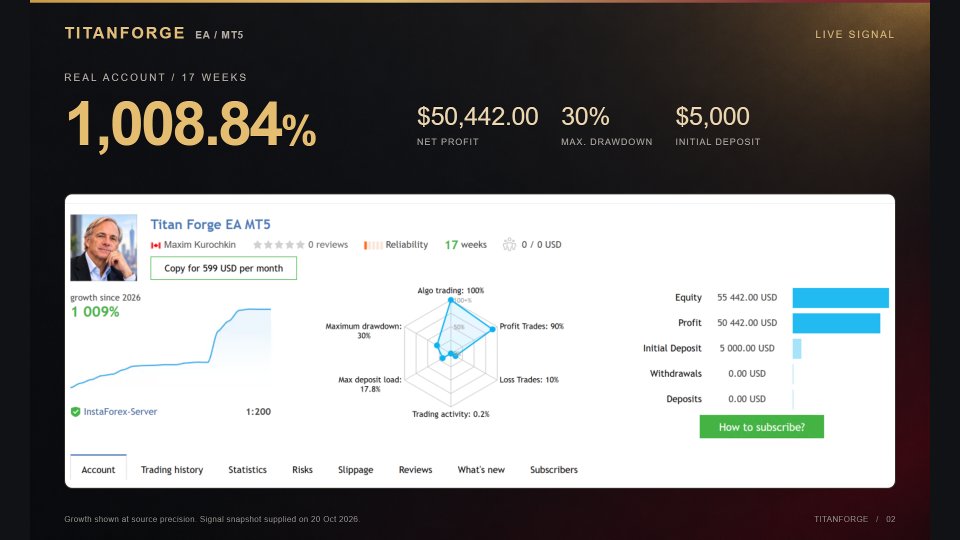
Historical backtests and live signal statistics represent past performance and do not guarantee future results.
Always select an appropriate risk level and evaluate the strategy under your own broker and account conditions.




Reviews
There are no reviews yet.